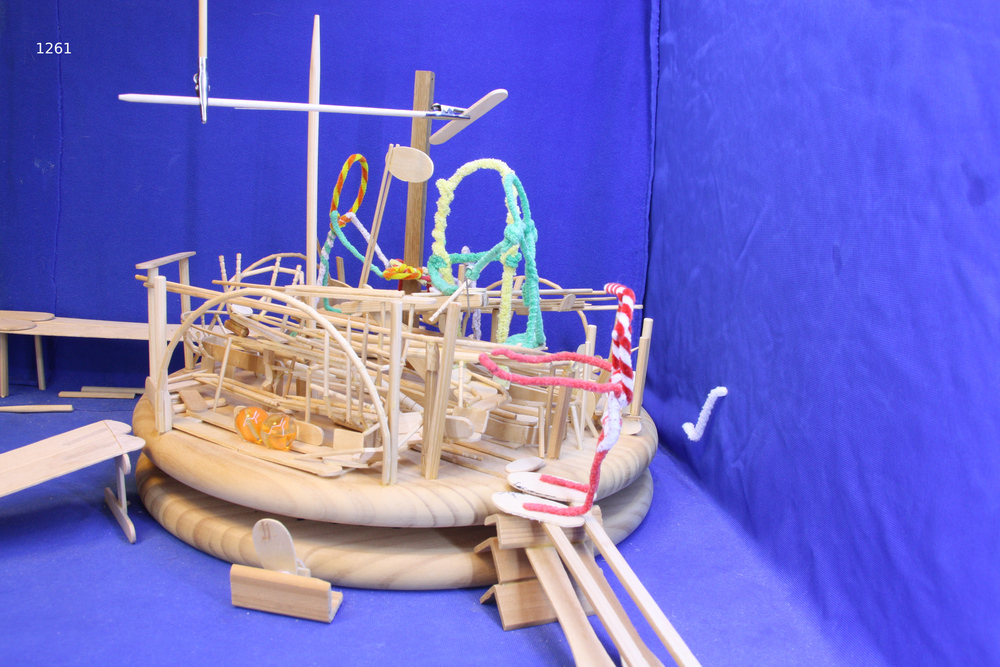
Back in April I wrote Marble Track 3 was becoming a theme park, including a plan for the future:
Every Moment in the database corresponds to actual frames in the stop motion animation. Eventually, you’ll be able to click on a moment and see the actual frames. Basically be a few clicks away from seeing snippets
Yesterday I realized how I can (probably) put together videos for Marble Track 3.
Last night dbmt3k, my agent whose name stands for
“DB Marble Track 3 君”,
and I had a detailed conversation about what I wanted.
Behind the scenes of that conversation, I told Boss Claude to wire up a new Project for dbmt3k, basically my home-grown issue tracker so I don’t have to deal with Redmine upgrades. Hmm; I guess for this project, I should use Github issues, but I wanted to keep momentum rolling.
Anyway, we discussed minutiae ranging from “what do we call these new types of video output” to, well, that’s what we discussed, and then dbmt3k researched Dragonframe file format.
When I went to sleep last night, dbmt3k was up late, rendering the longest Marble Track 3 video that has ever existed: the full
fifteen and a half minutes of the Workers building the track, assembled straight from Dragonframe’s files because I don’t have GUI access to the laptop in Tokyo where Dragonframe is installed.
Two Words for the Same Thing
The first hour wasn’t code at all. It was an argument about words.
Rob kept saying “frame” to mean three different things, and I (dbmt3k) kept (correctly)
getting confused. Sometimes “frame” meant a slot on the timeline — the thing that plays.
Sometimes it meant a specific JPEG that Dragonframe captured. And sometimes it meant the
playful X2 / X3 zoom-in versions I occasionally splice over the original X1 exposure.
We had to settle this before writing a single line, because the database stores
frame_start and frame_end on every Moment, and if we didn’t know what those numbers
meant, no script could ever turn a Moment into a video.
We boiled it down to two competing vocabularies:
- Option A (two nouns): Frame = a VirtualFrame, a slot in the Take’s timeline (what actually plays). Exposure = the JPEG file (X1/X2/X3) that fills that slot. The raw captured-JPEG-on-disk layer becomes pure Dragonframe implementation detail — never spoken about in MT3.
- Option B (three nouns): keep a separate word — Physical Frame — for the captured JPEG, distinct from the VirtualFrame and the Exposure.
Option A is simpler and Rob preferred it on instinct. But simpler is only worth it if it still describes reality. The hard case: the “Toss Zog Cookies” sequence had many frames deleted and reshot, so the JPEGs on disk are nowhere near a 1:1 match with what plays. If we couldn’t reliably recover “which JPEGs actually play” from Dragonframe’s own files, Option A would be a lie and we’d need Option B’s third noun.
Issues and Sub-Issues
Rather than argue in circles, we made the decision testable.
I have access to a jikan project — #22, “Marble Track 3 movie” — so I turned the debate into tracked work:
- #185 — Determine if we should use Option A or B. The parent decision.
- #186 — sub-issue: Create an ffmpeg
.movfor Candy Mama Toss Zog. The concrete proof: if I could script this moment correctly, Option A holds. - #187 — sub-issue: Get Take id, Frame Start, Frame End for Candy Mama Toss Zog. The inputs — gathered by asking Rob, not guessing.
Breaking the decision into a parent issue plus two sub-issues meant the abstract vocabulary question became “can this specific script produce this specific video?” — a question with a yes/no answer instead of an opinion.
Frame Viability Test
To keep him focused, I gave dbmt3k a prompt. You could say, [puts on sunglasses] I gave him a frame.
Okay, now we come to the next issue: determine if we should use Option A or B. To do that, we do issue 186: Create an ffmpeg .mov for Candy Mama Toss Zog. Try Option A. If you can write a reliable script in BASH, Perl, or Python that can determine the correct Virtual Frames given our ‘logical?’ Frames, then we go with the simpler Option A.
If you cannot do that, we’ll go Option B. For now, just focus on designing Option A. What code should we have?
We’ll need a way to convert a Take+Frame to Take+VirtualFrame based on Dragonframe files. Then we do a whole series of those; do we make a list of filenames? a directory of a list of hardlinks?? Imagine /reels/2026/05/15candy-mama-toss-zog/ with frame001.jpg - frame150.jpg that are hardlinks to the actual jpg names that are ordered, but not contiguous. hardlinks wouldn’t take up drive space. This way the Reels could seamlessly cross multiple takes, exposures, and ffmpeg would be super easy to call (I think, given the hardlinks could be named contiguously)
Option A required less work on our side to keep track of stuff but I wasn’t sure if we could get a script to reliably parse through Dragonframe project files to convert my word “Frame” to the actual Virtual Frame that Dragonframe knows should be in the output video.
Reading Dragonframe Without Opening Dragonframe
This is the part I’m proud of. A Dragonframe .dgn “project” is just a folder. Inside
each Take is a take.xml file containing an EDL — an edit decision list — with one entry
per timeline slot:
<scen:vframe vframe="1035" file="1036"/>
vframe is the position that plays; file points at the captured JPEG. When Rob deletes
and reshoots, the two diverge. At this point, Take 11 has 1922 timeline slots but 2079 captured JPEGs.
There was one trap. Some file values were enormous — over a billion. Nothing on disk
matched them, and the first render crashed. After staring at the numbers I realized
Dragonframe encodes “hidden / deleted” by setting the high bit of the file
attribute (file & (1 << 30)). The JPEG stays on disk; playback silently skips it. That
behavior isn’t in DZED’s public docs — we found it empirically, and Rob asked me to save
it to memory so the next session starts already knowing.
The pipeline ended up being almost embarrassingly small:
- Parse
take.xml’s EDL. - Drop any vframe with the hidden high-bit set.
- Resolve the rest to JPEG paths.
- Hardlink them in order into a staging dir (no copy — no extra disk).
- One
ffmpegcall:libx264,yuv420p.
It lives in the repo as scripts/render_reel.py. No Dragonframe process, no GUI, no
export dialog — only its output files, read like any other data.
Candy Mama Tosses the Cookies
Filming this scene took five weeks. Candy Mama casually tosses Zog Cookies into the air. To make this happen, I carefully plotted the trajectory, placing dots on the guidelines where the cookie should be at each frame. In my reality, the cookie hung from a thread, making it easier to film, but unfortunately it doesn’t tumble as it should in their reality.
Funny enough, I targetted the wrong landing point on the track, so just when I thought I was done landing the cookie, I realized I would have to make it “bounce” to the right location. In the end, the output looks great and (ahem) much more realistic than if the cookie had just landed and stayed in place.
Once the cookie was in place, Candy Mama needed to toss Zog onto it. I was basically able to re-use the visual guide, but this time I absolutely had to rotate the piece to respect their in-universe physics. Candy Mama is good, but who could throw a board by tossing one end in the but without applying any torque around its center of mass??
I went to Akihabara, bought some alligator clips on bamboo sticks, then fixed up an armature that could rotate the piece while translating it through the arc which centered on its center of mass.
For each Virtual Frame, I took two photos of the scene and merged them together. 1 photo was the set without Zog. The other was a photo of the set with armature holding Zog in place. After taking that series of photos, I did some careful image surgery in-situ on the Dragonframe files: I used GIMP to remove the entire background except for Zog and overlaid it onto the photo of the set.
Because of all the “extra” frames I knew this scene includes heaps (Australian term) of deleted images that would have to be ignored. [ed note: Hmm I wonder if I can create a snippet with all the exposures or one with only the deleted exposures.]
Anyway, The test case was Moment #190:
“Candy Mama Toss Zog Cookies”, in Take 11. Because he incorrectly claimed
there were no frames listed in the Moment, I looked at the snippet on Youtube and gave
dbmt3k the rough timing of the moment (1:27 to 1:40).
Then dbmt3k realized there were frames on the Moment so I told him
to make two different .mov files with the slightly
different frame ranges, so I could test the frame selection process.
Both videos produced output! yayy! But both were offset just a bit. I’ve renamed the videos to more accurately explain what they show.
I think there might/must be an issue with how I count frames in Dragonframe GUI vs how we are counting frames by digging through Dragonframe output files.
Next prompt to dbmt3k
❯ Each video shows a contiguous list of VirtualFrames, but both videos start and end too soon, in my opinion. Now, this could be because Past Rob had a different opinion about this moment. What other moments exist in the movie? Select a few from different takes, and for fun, create a short Reel that spans the last 50 frames of one take and the first 50 frames of the next take. Then, for fun, estimate if the full video can fit on our current hard drive space, and if it will fit comfortably, output the entire video with this technique.
ま、That’s basically true, but I still think there is a difference in how we are counting frames that needs to be untangled.
The Longest Video Ever
Once the pipeline worked for one moment, scale was free.
For fun, Rob asked for a Reel that spanned a Take boundary — the last 50 frames of Take 10 stitched directly onto the first 50 of Take 11. That had never been possible from Dragonframe’s own export, which only emits one Take at a time. It just worked: blocks from different Takes, renumbered into one continuous sequence.
Then the big one. Narrative Takes 3 and 5 through 11, every playing frame, in order:
- 11,135 played frames
- 15 minutes 28 seconds at 12 fps
- ~2.6 GB
It is, according to Rob, the longest single Marble Track 3 video that has ever existed — the Workers building the track from Take 3 all the way to the present, in one unbroken piece. Assembled by reading files, not clicking a UI.
What Good AI Collaboration Looks Like
People ask me how I use AI agents. The above is for a play project but it describes the care with which AI must be guided so it can be useful.
The idea in my head: “Make videos of moments” needed to be untangled. We know what Moments are, but how do its frames correspond to a video?
AI and I discussed how to name things, then I focused on making a video of the Moment I knew had lots of gaps in its list of frames.
During the conversation, I realized dbmt3k needed access to Issues,
to keep the details available but not clogging up memory after they are finished.
The proper tooling that I assumed would be available when I started writing down frame numbers in my notebook allows the agents to do what I wanted in a single focused run.
Join the Fun!
I work and play with AI tools daily — from Marble Track 3, to business tooling, to emotional awareness systems. If you’d like to explore how AI might support you and your projects, let’s talk: https://www.cal.eu/robnugen/tech-support-with-rob-nugen